
I have been building a website for a brick and mortar business recently. It is not only a brochure site. It has catalog pages, offer pages, an inquiry form, staff admin panel, image upload, lead dashboard, and WhatsApp handoff.
The project is split into two repos:
- one repo for the public website and admin UI
- one repo for the content API, database, upload, and inquiry backend
I want to write down the stack while it is still fresh, because I know I will forget the small decisions later. This is not a "best stack for everyone" post. It is just what I use, what problem it solves, and why I am okay with the trade off.
This is part one. I will cover the technical stack: frontend, UI, content API, database, auth, uploads, deployment, and tooling. Part two covers the operational side: the inquiry flow, caching decisions, SLO/SLA, and disaster recovery.
Frontend: TanStack Start
The frontend is built with TanStack Start, React 19, TanStack Router, and Vite. I picked it because I wanted server-side rendering, file-based routing, and normal React without going too far into a full framework that hides too much.
The routes map quite directly to the business:
- catalog routes for browsing categories and items
- offer routes for bundles or promoted items
- service routes for general business services
- inquiry route for customer request
- admin route for staff dashboard and content editing
TanStack Router makes this easy because the route file is the route. I can open an admin route file and I know which admin page it controls. No guessing.
For data fetching, I use TanStack Query mostly on pages that need client-side state, pagination, filtering, or mutation. For example, the admin pages use it for listing catalog items, inquiries, offers, services, departments, and then invalidating the data after updates.
Request flow
A request moves through the system in two ways: the public reading path (most visitors, served from cache when possible) and the admin write path (staff, always fresh, with auth).
Public read path:
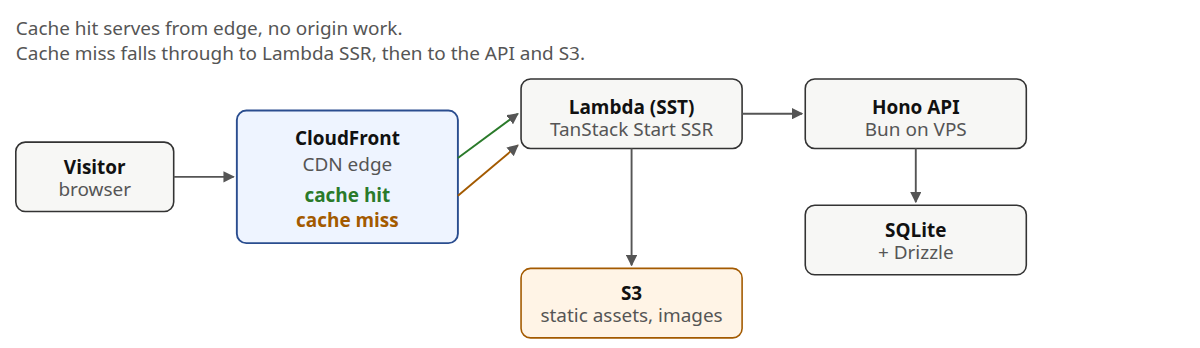
The point of the read path is that most visitors never touch the API. CloudFront serves the page from the nearest edge. Only cache misses, server side rendering, and route prefetches actually run Lambda.
Admin write path:
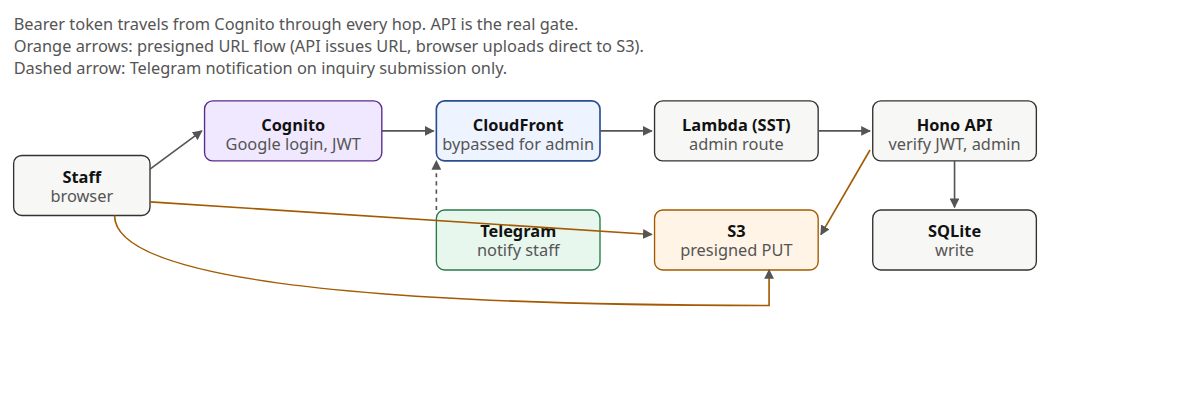
The admin path is always fresh. CloudFront is in front of the assets, but admin API calls do not rely on a cached response. The API checks the Cognito JWT and the admin group on every request, so the frontend hiding the route is just a courtesy. The backend is the real gate.
For image upload, the API does not stream the file. It returns a presigned S3 URL, and the browser uploads directly to S3. For inquiry submission, the API also fires a Telegram notification to staff.
UI: Tailwind, shadcn, Radix, and TipTap
The UI stack is quite standard now:
- Tailwind CSS v4 for styling
- shadcn style components
- Radix primitives under the hood
- Lucide icons
- Figtree as the font
- TipTap for rich text editing in admin
I use this because the admin UI has many boring controls: tables, forms, dialogs, selects, upload field, editor, badges, pagination. I do not want to design each from zero.
The public site can be more custom, but the admin side should be predictable. Staff need to add item details, edit offer descriptions, upload images, and check inquiry submissions. Nobody wants a fancy CMS when they are just trying to update a price or description.
Content API: Bun and Hono
The backend is a separate API built with Bun, Hono, and TypeScript.
Hono fits this project nicely because it stays small. The API has public routes for reading catalog items, offers, services, FAQs, and submitting inquiries. It also has admin routes for creating and editing content.
I use @hono/zod-openapi, so the request schema, validation, and OpenAPI docs stay close together. The API exposes /doc for the OpenAPI document and /ui for Swagger UI. This is useful because the frontend and backend are separate projects. When I forget the shape of an endpoint, I do not need to inspect three files. I can check the docs.
I also split public routes and admin routes. For example, public catalog reading and catalog admin are not mixed into one big file. It makes the permission boundary easier to see.
Database: SQLite and Drizzle
The content API uses SQLite with Drizzle ORM. Bun has native bun:sqlite, so the setup is very direct.
The database stores:
- catalog items, categories, and tags
- services
- offers, offer items, and add-ons
- departments
- inquiries
- FAQs
- image conversion records
Some fields are flexible JSON stored in SQLite text mode, like dimensions, options, images, personalization choices, and inquiry attachments. I am okay with that because this domain has many semi-structured details. A brick and mortar business usually has a messy real-world catalog, and not every item follows the same option shape.
Drizzle gives me type-safe queries and migration files without making the project feel heavy. It is still SQL at the end. I like that.
SQLite is also enough for this workload. This is not a high traffic marketplace. It is a business website with content reads, inquiry submissions, and staff edits. A single SQLite file is easier to backup, move, and inspect than a managed database.
Backups: Litestream
The main concern with SQLite is durability. A single file is simple, but I still need backup.
For that I use Litestream. The production service can run the API through Litestream replication, and Litestream copies the SQLite database to S3. The bucket is in ap-southeast-1, same region I use for the rest of the AWS resources.
This gives me a boring backup story:
- SQLite stays local to the VPS.
- Litestream replicates it to S3.
- If the server dies, restore the database and run the service again.
It is not as fancy as managed Postgres, but it matches the project size.
Auth: Cognito and Google login
Admin access uses AWS Cognito. On the frontend, Amplify handles the hosted login flow with Google as the provider. On the API side, the admin middleware verifies the Cognito JWT.
The API checks the Bearer token, expiry, issuer, RS256 signature using Cognito JWKS, and the admin group. So the frontend can hide admin pages, but the backend is still the real gate.
There is also a local dev bypass. In development, I can go to /dev-login, pick a mock admin user, and the frontend sends Authorization: Bearer dev-bypass. The content API accepts that only when SKIP_AUTH=true.
This saves a lot of time. I can test the full admin flow locally without fighting Cognito every time. But production still uses real Cognito tokens.
Uploads: S3 presigned URL
Image upload goes through the content API, but the file itself does not pass through the API server.
The flow is:
- Admin UI asks the API for a presigned upload URL.
- API creates a safe S3 key with sanitized filename and UUID.
- Browser uploads directly to S3 with
PUT. - The content record stores the image URL or key.
The API has MIME allowlists for images and documents, configurable expiry, and optional CDN base URL. This is enough for catalog images and staff-uploaded files.
Deployment
The frontend is deployed with SST to AWS. The Vite/Nitro config targets AWS Lambda with streaming, and SST uses sst.aws.TanStackStart. The app runs in ap-southeast-1 with Node.js 22 runtime.
The content API is more old school. It is designed for a small VPS:
- install Bun, SQLite, and Litestream
- run the API with systemd
- deploy by git pull or rsync script
- let Litestream handle database replication to S3
I like this split. The frontend benefits from AWS managed hosting and Lambda. The API benefits from being a simple always-on process next to SQLite.
Environment and tools
Both projects use TypeScript. Both use Bun as the package manager. Both have typecheck, lint, format, and test scripts.
The frontend uses:
- Vite
- TanStack Start
- Vitest
- Playwright
- Testing Library
- T3 Env for environment validation
- SST for deployment
The content API uses:
- Bun test
- Drizzle Kit migrations
- ESLint and Prettier
- T3 Env with Zod
- endpoint test scripts for catalog items, services, offers, inquiries, uploads, FAQs, departments, and images
I also use precommit scripts, but I am still practical about it. The goal is not to make the tooling impressive. The goal is to catch type errors and obvious mistakes before deploy.
In the next post I will cover the operational side: how the inquiry flow works, why I lean on CloudFront cache, the SLO and SLA I am willing to commit to, and the disaster recovery plan.